
Recent Posts
[APK] Camera NX 7.4 is Here, Base on Google Camera 5.2, All Features & Bring back HDR+ for Nexus2015![[APK] Camera NX 7.4 is Here, Base on Google Camera 5.2, All Features & Bring back HDR+ for Nexus2015](../../wp-content/uploads/2016/12/Camera-NX-Google-Camera-MOD-260x150.jpg) [APK] Enable Portrait mode on Nexus 5X/6P & OG Pixel phone with Google Camera mod (Updated 7.3.1)
[APK] Enable Portrait mode on Nexus 5X/6P & OG Pixel phone with Google Camera mod (Updated 7.3.1)![[APK] Enable Portrait mode on Nexus 5X/6P & OG Pixel phone with Google Camera mod (Updated 7.3.1)](../../wp-content/uploads/2017/12/Portrait-mode-on-Nexus-5X-with-Camera-NX-mod-260x150.png) [Updated] Camera NX V7.2 for Nexus 5X/6P & Pixel Base on Google Camera 5.1 from Pixel 2, Motion Photo and More
[Updated] Camera NX V7.2 for Nexus 5X/6P & Pixel Base on Google Camera 5.1 from Pixel 2, Motion Photo and More![[Updated] Camera NX V7.2 for Nexus 5X/6P & Pixel Base on Google Camera 5.1 from Pixel 2, Motion Photo and More](../../wp-content/uploads/2017/10/Camera-NX-v7-260x150.jpg) Download Camera NX V6 mod for Nexus 2015 Phones, Base on Google Camera v4.4 (Updated New Version)
Google Camera 4.4 Update with New Pixel Phone 2017 Support, New Hardware Zsl Hdr+ Feature, And More.
Download Camera NX V6 mod for Nexus 2015 Phones, Base on Google Camera v4.4 (Updated New Version)
Google Camera 4.4 Update with New Pixel Phone 2017 Support, New Hardware Zsl Hdr+ Feature, And More.
Featured Post
Tag Archives: CyanogenMod
Things Should be Prepare Before Install CyanogenMod 10.2 for Nexus 4
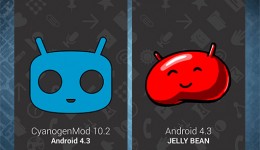
CyanogenMod(CM) team has began working on CyanogenMod 10.2 since the day that Android 4.3 was announced on July 25th, we knew that CyanogenMod 10 is based on Android 4.1 and CM10.1 is based on Android 4.2, so CyanogenMod 10.2 is based on the Android 4.3, they call it a “Sweeter Jellybean”, as it brings a bunch of improvements to the current Android 4.2.2 system, such as low energy bluetooth, better photosphere, saving more battery, OpenGL ES 3.0 and many other humane improvements.
How to Optimize the Automatic Backlight Settings in CyanogenMod 10.1 - Guide
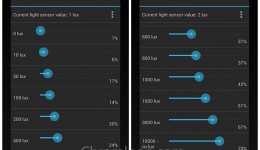
Using Google Nexus 4 running CyanogenMod 10.1, you may notice that the default automatic backlight is a little too bright, especially at night. The second thing is, As the Nexus 4 use IPS LCD, the higher backlight brightness will drain more battery. Why not optimize the Automatic Backlight settings to protect your eyes and save more battery? here is the guide tell you how to optimize the Automatic Backlight settings in CyanogenMod 10.1(CM10.1).
How to Move Apps to SD Card, Apply App2sd on Xperia X8 / W8
You may want to get more space to install games or apps on your Xperia X8 / W8, then you need to apply the App2sd (application to SD card) function. Here is a App2sd-active guide for you.
First thing you need to do is update your Xperia X8 / W8 to Cyanogen Mod rom, Android 2.2 or 2.3, and I have post a installation guide for installing custom roms. Check it out here if you are using the stock Android 2.1 firmware.
Update to Android 4.0 Ice Cream Sandwich, Can it be Possible?

Google has announced the Android 4.0 code name Ice Cream Sandwich, turns out “Android 4.0 Ice Cream Sandwich” is the most popular search term on Internet. People want to know that whether their Android smart phones could update to this new system, unfortunately, if you don’t own the Nexus series phones, you have to put your hopes on the third party developers, like CyanogenMod team, and as the Android 4.0 source code still not release, we have to wait until CM team get the source code and begin to cook the new rom, so the “CyanogenMod 9” rom will be available on December at the earliest. 🙂
How to Remove Phone Numbers from Blacklist in CyanogenMod
A strange thing happened three days before, I can’t call my girlfriend with the short phone number (a service that calling each people who set in a group for free with month payment in China), the phone just one beep then hang up, but I can call her with the original phone number. I have try restart both her and my phone, make sure there is full network signal, but still no luck, everybody can call her except me. This morning I sit down and thinking about the reason, suddenly I get an idea, it is the blacklist phone call.
CyanogenMod Team Join Samsung Mobility

CyanogenMod, The famous Android system custom team, founded on 2009, announced that they have join Samsung mobility today, its founder Steve Kondik has entry Samsung as a software engineer . CyanogenMod is the most popular provider of custom firmware of Android mobile phones, include many Android phones such as HTC G series, Samsung Galaxy series, Motorola Droid , now they join Samsung Mobility to bring technical support for Samsung Android phone experience . Steve Kondik said, this will make Android become better.
Does Milestone’s Camera Support New Feature in CM7: Touch-to-Focus?
We have seen the latest CyanogenMod 7 add the touch-to-focus feature in camera app, Nadlabak just merge it into CM7 for Milestone sources.
camera: Implement touch-to-focus
Touch-to-focus is implemented on supported cameras. Does not work in
camcorder mode yet (framework code is needed to support this).
How to custom the overclock profile in Milestone with CM7
CM7 support overclock the Milestone cpu simply, the OMAP 3430 cpu original speed is 550 mHz, we can overclock it to 1000 mHz for getting snappy operating experience, but the phone will get to high temperature if you run HD games, consider it’s summer here, I subject to set a lower frequency, like 800mHz.
In the default CM7 overclock profile, 900mHz is the highest frequency, here is the method to get ride of the default setting.
Add CrystalTalk to CyanogenMod 7 (update package for milestone)
PS.
here is a update verson for CM7 for Milestone A853 RC11 +
The one reason why I brought Moto Milestone is Moto use CrystalTalk tech in theirs mobile phones. You should know there is no CrystalTalk in the CyanogenMod for Milestone, some people want to adding this amazing function in CyanogenMod, here is an update.zip file for you.
 Subscribe to Chromloop