
Recent Posts
[APK] Camera NX 7.4 is Here, Base on Google Camera 5.2, All Features & Bring back HDR+ for Nexus2015![[APK] Camera NX 7.4 is Here, Base on Google Camera 5.2, All Features & Bring back HDR+ for Nexus2015](../../wp-content/uploads/2016/12/Camera-NX-Google-Camera-MOD-260x150.jpg) [APK] Enable Portrait mode on Nexus 5X/6P & OG Pixel phone with Google Camera mod (Updated 7.3.1)
[APK] Enable Portrait mode on Nexus 5X/6P & OG Pixel phone with Google Camera mod (Updated 7.3.1)![[APK] Enable Portrait mode on Nexus 5X/6P & OG Pixel phone with Google Camera mod (Updated 7.3.1)](../../wp-content/uploads/2017/12/Portrait-mode-on-Nexus-5X-with-Camera-NX-mod-260x150.png) [Updated] Camera NX V7.2 for Nexus 5X/6P & Pixel Base on Google Camera 5.1 from Pixel 2, Motion Photo and More
[Updated] Camera NX V7.2 for Nexus 5X/6P & Pixel Base on Google Camera 5.1 from Pixel 2, Motion Photo and More![[Updated] Camera NX V7.2 for Nexus 5X/6P & Pixel Base on Google Camera 5.1 from Pixel 2, Motion Photo and More](../../wp-content/uploads/2017/10/Camera-NX-v7-260x150.jpg) Download Camera NX V6 mod for Nexus 2015 Phones, Base on Google Camera v4.4 (Updated New Version)
Google Camera 4.4 Update with New Pixel Phone 2017 Support, New Hardware Zsl Hdr+ Feature, And More.
Download Camera NX V6 mod for Nexus 2015 Phones, Base on Google Camera v4.4 (Updated New Version)
Google Camera 4.4 Update with New Pixel Phone 2017 Support, New Hardware Zsl Hdr+ Feature, And More.
Featured Post
Tag Archives: custom
[Guide] How to Port Pixel Navigation Bar Animation to Your Phone (Updated to 7.1.1 Final)
![[Guide] How to Port Pixel Navigation Bar Animation to Your Phone (Updated to 7.1.1 Final)](../../wp-content/uploads/2016/11/Nav-bar-animation-Pixel-260x150.jpg)
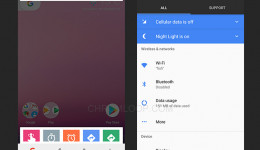
After I posted the Pixel Navigation bar animation mod for Nexus 5X / Nexus 6P, I have received a number of people’s messages, they were asking me to port the animation to their Roms. So I have tried on some custom Rom and succeed in 7.1 Rom, like Oneplus One with AOSP Rom, HTC M8 with CM 14.1, and Nexus 6 running UBERSTOCK Rom, but failed with all the 7.0 Roms, maybe someone could pointed out if the failure is API related.
How to Change the Size of Navigation Bar on Nexus 4 - Guide
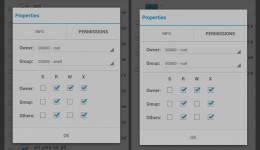
Some people consider that the size of navigation bar on Nexus 4 is too big, but there is no such option to change the size of navigation bar in stock Android, some custom roms allow user to change it or hidden it, but if you don’t want to change your rom, here is a method of Changing the Size of Navigation Bar on Nexus 4.
How to Optimize the Automatic Backlight Settings in CyanogenMod 10.1 - Guide
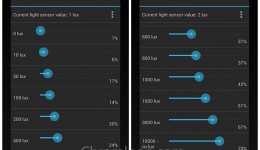
Using Google Nexus 4 running CyanogenMod 10.1, you may notice that the default automatic backlight is a little too bright, especially at night. The second thing is, As the Nexus 4 use IPS LCD, the higher backlight brightness will drain more battery. Why not optimize the Automatic Backlight settings to protect your eyes and save more battery? here is the guide tell you how to optimize the Automatic Backlight settings in CyanogenMod 10.1(CM10.1).
[Video] Ice Cream Sandwich for Xperia X8
![[Video] Ice Cream Sandwich for Xperia X8](../../wp-content/uploads/2011/11/ICS-for-X8-lock-screen-260x150.jpg)
Before yesterday, I still think it is no chance to update my Sony Ericsson X8 to Android 4.0 Ice Cream Sandwich, as more and more developers turn to develop roms for new phones, but recently, A Thread float up in the XDA-developers forum, telling people that they have succeeded in running ICS on Xperia X8,
How to Move Apps to SD Card, Apply App2sd on Xperia X8 / W8
You may want to get more space to install games or apps on your Xperia X8 / W8, then you need to apply the App2sd (application to SD card) function. Here is a App2sd-active guide for you.
First thing you need to do is update your Xperia X8 / W8 to Cyanogen Mod rom, Android 2.2 or 2.3, and I have post a installation guide for installing custom roms. Check it out here if you are using the stock Android 2.1 firmware.
How to Disabled 5 Points Touch on CyanogenMod 7 for Milestone A853

CyanogenMod 7 for Milestone A853 RC 12 has 5 points touch feature, well it sounds great, we could cut five fruits at the same time in Fruit Ninja, but after some hours with 5 points touch, some side effect just appeared, some games, for example, Fruit Ninja, it runs very slow after the game began a few minutes. It can be confirmed that the game runs normally if you remove the 5 points touch module. Another side effect is lag scrolling, So I think the 5 points touch module needs some work to improve.
Here is the way to disable the 5 points touch module:
Turn off dsi fix module to avoid suspend problem on CM7 RC11 / RC12
Update: now you can use the new DSI fix module (dsifix v2.1), that is a new DSI fix solution that not relate the suspend program, so there is no more suspend issue now.
If you have flashed the recently CyanogenMod 7 RC11 / RC12 for Milestone A853, you should temporary disable the dsifix module, because it will make the phone can not suspend mode when the fix is working after some time. To turn off it, just rename the file “dsifix.ko” to “dsifix.ko.1” in folder “/system/lib/module/”.
if you want to avoid this issue without disable the dsifix module, you can connect your phone with the usb cable, that will recover the error state, but the next error will appear again after some time, this has explained why some people suffered battery drain when they have update to the new rom, when the issue occur, you show only saw the Android OS eats more than 50% battery even the phone is not being use.
Also i find out another bug cause by the dsifix module, see How to active and control the touch-to-focus mode on the CyanogenMod 7.1 (update)
Nadlabak is testing a new dsifix module, I will be waiting for the next build. Good job Nadlabak.
How to optimize the automatic backlight settings in CyanogenMod 7
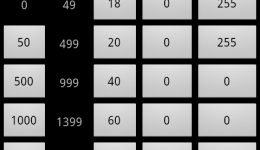
Some people does not like the original setting of automatic backlight(automatic brightness) in Android, it’s always too bright nor too dark, the light sensor is there, so it can be tweak by manual . I would like to tell you how to optimize the automatic backlight settings in CyanogenMod 7(CM7) step by step.
 Subscribe to Chromloop